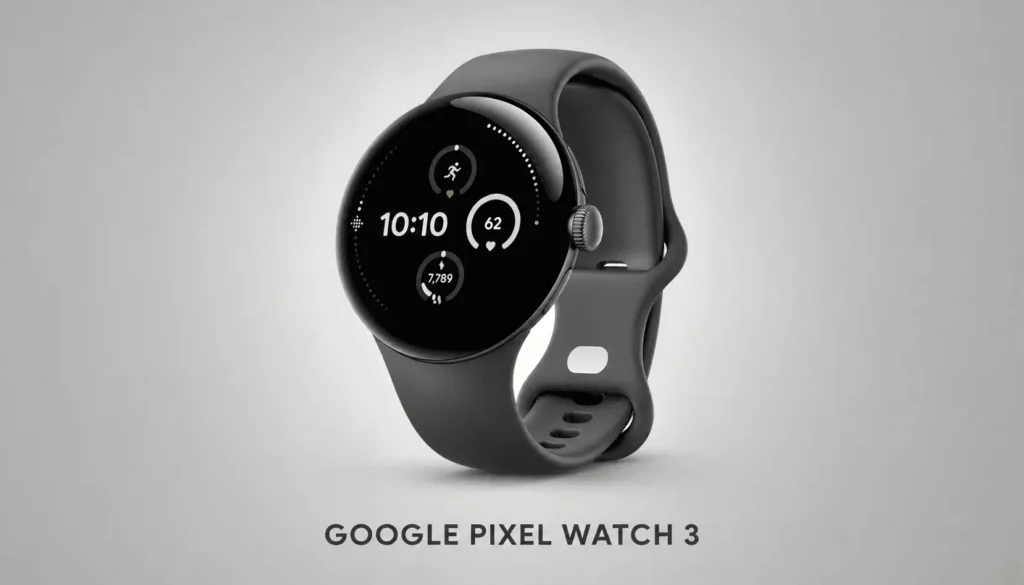
The Google Pixel Watch 3 combines the smooth design of the Pixel family with Fitbit-powered activity tracking and the flexibility of Wear OS. It is built for Android users who want health information, Google applications, communication tools, and customizable fitness features in one compact device.
Although Google has since introduced a newer Pixel Watch generation, the Pixel Watch 3 continues to receive software improvements. Updates released in 2026 expanded one-handed gesture controls and added an express Google Wallet payment option, helping the model remain relevant.
First Decision: 41 mm or 45 mm?
The Pixel Watch 3 was the first generation in the series to give buyers a true size choice. Both versions share the same processor, storage, memory, sensors, display technology, and primary software experience.
| Feature | 41 mm | 45 mm |
|---|---|---|
| Case diameter | 41 mm | 45 mm |
| Thickness | 12.3 mm | 12.3 mm |
| Weight without band | 31 g | 37 g |
| Battery capacity | 307 mAh | 420 mAh |
| Maximum rated battery | 24 hours | 24 hours |
| Battery Saver estimate | Up to 36 hours | Up to 36 hours |
The 41 mm version is lighter and generally better suited to smaller wrists or users who want a discreet smartwatch. The 45 mm model offers more screen space for maps, notifications, workout metrics, and touch controls.
Wrist-Fit Guide
- Choose 41 mm for a lighter profile and easier overnight wear.
- Choose 45 mm for larger text and more visible workout information.
- Select the larger version when battery capacity matters more than minimum weight.
- Compare the case size with a watch you already own before ordering.
The Display Experience
Both sizes use a 320-ppi LTPO AMOLED Actua display protected by custom 3D Corning Gorilla Glass 5. The panel can reach a peak brightness of 2,000 nits and adjust between 1 and 60 Hz to balance responsiveness with energy use.
The curved glass creates the Pixel Watch’s signature pebble-like appearance. It looks modern and helps watch faces flow toward the case edges, although exposed curved glass may require more care around hard surfaces.
Why Runners Should Pay Attention
The Pixel Watch 3 added an advanced workout builder, real-time wrist guidance, and running-form metrics. Users can create structured sessions involving warmups, intervals, pace targets, heart-rate zones, and recovery periods.
After a run, Fitbit’s analysis can display information such as cadence, stride length, pace, and other performance trends. These measurements help runners understand how their movement changes as speed, terrain, or fatigue changes.
A Sample Training Week
| Day | Pixel Watch 3 use |
|---|---|
| Monday | Easy run with heart-rate monitoring |
| Tuesday | Strength workout recording |
| Wednesday | Sleep and readiness review |
| Thursday | Custom interval session |
| Friday | Recovery walk |
| Saturday | Longer GPS-recorded run |
| Sunday | Weekly activity analysis |
Automatic detection can recognize several activities, including walking, running, cycling, rowing, and elliptical workouts. The watch can then remind the user to start or stop recording.
Google Services on Your Wrist
Wear OS provides access to Google Maps, Google Wallet, messaging, calls, calendars, notifications, Fitbit, and downloadable applications from Google Play. Available apps and features can vary by device, account, and region.
LTE versions provide more independence when connected to a supported carrier plan. Bluetooth and Wi-Fi models depend more heavily on a nearby phone or available network for calls, messages, and online functions.
The Pixel Watch 3 works with most phones running Android 10 or newer. It requires a Google Account and the Google Pixel Watch application, and it is not designed for iPhone compatibility.
Health and Safety Tools
The sensor system includes optical heart-rate monitoring, SpO2 sensors, electrical sensors compatible with ECG, skin-temperature sensing, cEDA body-response tracking, an altimeter, barometer, compass, accelerometer, and gyroscope.
Fitbit integration supports activity, exercise, heart-rate, and sleep tracking. Health measurements are intended for wellness information and should not replace evaluation from a qualified medical professional.
Battery and Charging Reality
Both models are rated for up to 24 hours with the always-on display enabled or up to 36 hours in Battery Saver mode. The 41 mm model can reach approximately 50% charge in 24 minutes, while the 45 mm version takes about 28 minutes under Google’s test conditions.
Battery life remains the main compromise. Users who record long GPS sessions or frequently use LTE, apps, notifications, and the always-on display should expect regular charging.
Pros and Cons
Strengths
- Two useful case sizes
- Bright LTPO AMOLED display
- Strong Fitbit integration
- Structured running workouts
- Google Maps and Wallet access
- Downloadable Wear OS applications
- ECG-compatible and cEDA sensors
- Continued software improvements
Limitations
- Daily or near-daily charging
- No iPhone support
- Curved glass is relatively exposed
- LTE requires a compatible carrier plan
- Some health tools vary by region
- Newer Pixel Watch models are available
Final Verdict
The Pixel Watch 3 is an excellent match for Android users who want Google services and Fitbit tracking in one polished device. Its strongest combination is not any single sensor or application, but how smoothly navigation, payments, notifications, exercise, and health information work together.
The battery prevents it from becoming an expedition watch. For everyday productivity and fitness, however, it remains one of the most complete Android smartwatch experiences.